

I have made some changes to the Portal page.
Formatting it to more of a mobile friendly with the layout. Breaking it up with tabs at the top to help show more relevant data for those mobile users. 65% - 70% are mobile users. But this layout still works for desktop and tablet as well.
The Recent Forum Activity area looks a bit different, but it works just like the old one. It is much less of a custom item and more built in vs before. Your browser should not automatically jump down to that area like it used to do each time it loaded.
I will tweak the content a bit going forward, but hopefully it is not too much of a shock.
Questions?
Do not like how this board is run?
Get your own board!
♃

When I click on a thread on the Portal Page, it takes me to the last post. Before it used to take me to the last post I had read.

I cannot click on the last reply, the one that shows up on the portal.
When you tell somebody somethin', it depends on what part of the United States you're standin' in... as to just how dumb you are.
Working on it.
Do not like how this board is run?
Get your own board!
♃

Is there a tab to move beyond page one of the recent portal topics?
When I click on a thread on the Portal Page, it takes me to the last post. Before it used to take me to the last post I had read.
Went back to the old module.
Do not like how this board is run?
Get your own board!
♃
I just hate how that Recent Post module just jumps down to that part of the page and I have never been able to fix it. Bug the $h!t out of me.
Do not like how this board is run?
Get your own board!
♃
One change I notice since you switched back as that when you open a thread, and get to the bottom of it and continue scrolling after the last post down to “recent topics,” that list is not bolding the threads with unread posts; you have to go back to the portal page to see the bolded titles.
Does that make sense?!
Does that make sense?!
No clue what you mean.
Do not like how this board is run?
Get your own board!
♃

Regarding Cowgirl's post, there's a "Recent Topics" at the bottom of each page. On the regular Portal page, the topics that have new posts are bold text to highlight that they are unread. At the bottom of each page, they're just listed there, not in bold.
On a different topic with the new layout. Is it possible to get rid of the "Active Participants" and "Topic Overview" at the top of the page? Takes up a full page on my phone and really doesn't add much that seems useful.
On a different topic with the new layout. Is it possible to get rid of the "Active Participants" and "Topic Overview" at the top of the page? Takes up a full page on my phone and really doesn't add much that seems useful.
Yeah... I think I clicked a setting a few days ago. Need to figure out which one I clicked on to turn it off.

Do not like how this board is run?
Get your own board!
♃
Regarding Cowgirl's post, there's a "Recent Topics" at the bottom of each page. On the regular Portal page, the topics that have new posts are bold text to highlight that they are unread. At the bottom of each page, they're just listed there, not in bold.
Ah... I think I got you.
I have been tweaking some code, but I do not believe I did anything with that. But there was also plugin update that I did at the same time I was making changes. There is a good chance that something was changed in the plugin itself to cause the issue. Seeing that I did both at the same time, it will be tough to figure out if it was me or the message board plugin itself.
Do not like how this board is run?
Get your own board!
♃
So I’m not crazy. 😂
edit. Don’t answer that.
Yeah... I was only messing with some CSS code that would only affect the Portal Page with the Recent Posts "Widget". The non bolding and other issues with the Recent Topics "widget" I have not touched. And certainly how works on all pages. So the only thing I can think of is that when I updated the plugin on Thursday, something changed from the developer of the plugin.
Do not like how this board is run?
Get your own board!
♃
Looks like you turned them off now.On a different topic with the new layout. Is it possible to get rid of the "Active Participants" and "Topic Overview" at the top of the page? Takes up a full page on my phone and really doesn't add much that seems useful.
Yeah... I think I clicked a setting a few days ago. Need to figure out which one I clicked on to turn it off.
As always, thanks for all you do around here
Another fun thing I just discovered is that if I clink a link on the unbolded threads in the list at the bottom of a topic page, it takes me to the first post in the thread. Even if I know it’s a thread with unread posts from the main portal page.
Another fun thing I just discovered is that if I clink a link on the unbolded threads in the list at the bottom of a topic page, it takes me to the first post in the thread. Even if I know it’s a thread with unread posts from the main portal page.
Yep... I was just messing around with that while trying to figure out the bolding issue. It should be back to first unread now.
Do not like how this board is run?
Get your own board!
♃
I’m still getting first post on any thread, unread or not. (When clicking on a non portal page topic list).
Don't know about that part. I'm going to the first unread, both phone and PCI’m still getting first post on any thread, unread or not. (When clicking on a non portal page topic list).
Don't know about that part. I'm going to the first unread, both phone and PCI’m still getting first post on any thread, unread or not. (When clicking on a non portal page topic list).
Probably a cache thing on your local browser. I have been turning things on and off this morning trying to figure things out. I can't control locale cache.
Do not like how this board is run?
Get your own board!
♃
I just cleared all my web data and browser history and it’s still happening. I still use an iPhone. 😂
I get last unread post from the list on the portal page, but first post if I click the same link from the list on a topic page. 🤷♀️
not a huge deal to have to always go back to portal!
Regarding Cowgirl's post, there's a "Recent Topics" at the bottom of each page. On the regular Portal page, the topics that have new posts are bold text to highlight that they are unread. At the bottom of each page, they're just listed there, not in bold.
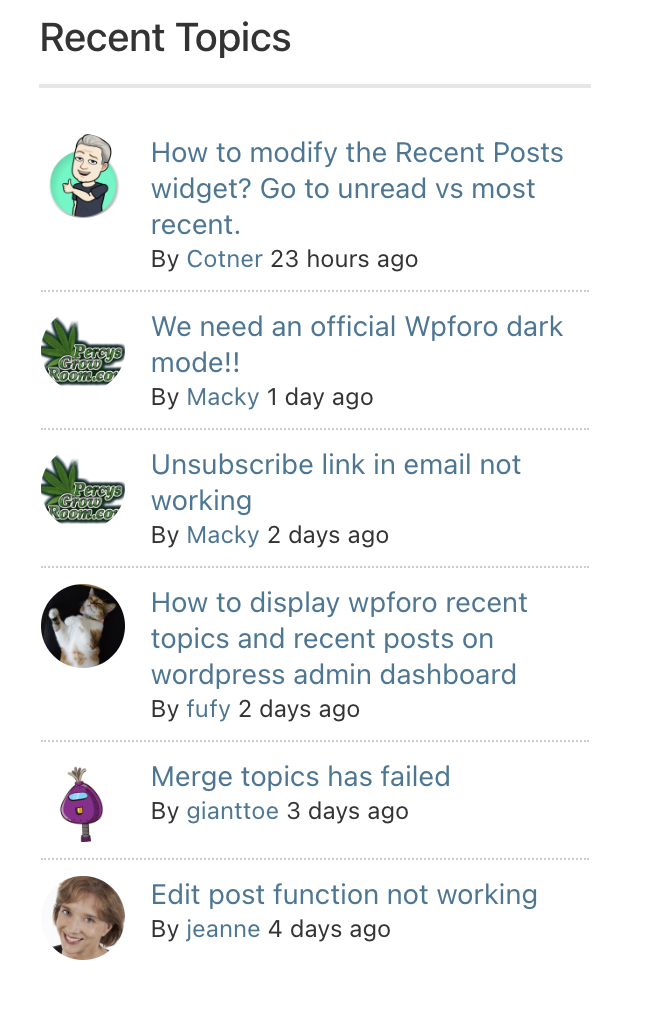
I am looking at the WPForo site and their recent topics is not showing bold. So I would assume that this is a backend change they made.
Do not like how this board is run?
Get your own board!
♃
Regarding Cowgirl's post, there's a "Recent Topics" at the bottom of each page. On the regular Portal page, the topics that have new posts are bold text to highlight that they are unread. At the bottom of each page, they're just listed there, not in bold.
I am looking at the WPForo site and their recent topics is not showing bold. So I would assume that this is a backend change they made.
Thanks for looking into it! I guess if they don’t fix it to go to the last unread post there’s no point in having the list at the bottom of individual topics (or is that default that you can’t control?)
Certainly makes sense. If the plugin/software changed it's basic functionality, there may not be a lot you can do.
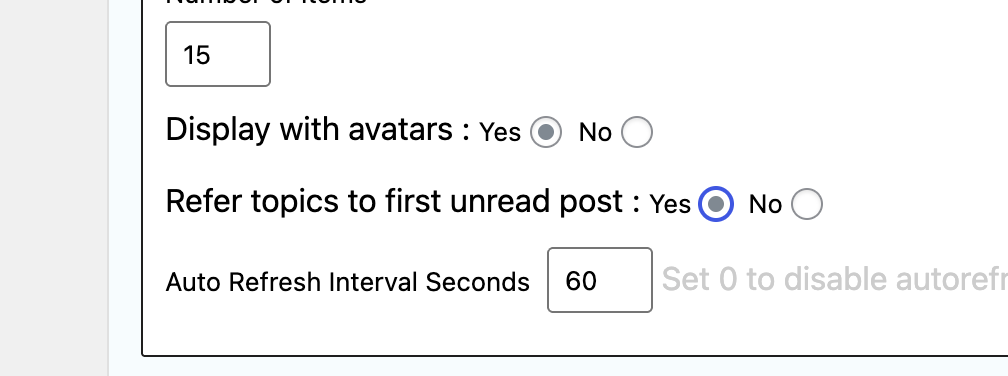
I think I figured it out. I keep trying to save "Refer topics to first unread post:" to YES. But after I save it and refresh, it reverts to NO. So something strange is happening. I cannot get it to save.
Do not like how this board is run?
Get your own board!
♃
@jupiter we appreciate the effort and work to keep this site running!
Now if you can find the on switch for the team tonight…😁
@jupiter we appreciate the effort and work to keep this site running!
Now if you can find the on switch for the team tonight…😁
Since it would not save on the page, I went to the backend database and changed the "0" to a "1" for that particular setting and I think it is fixed.
The problem with this and many plugins is that they are using "Legacy" widgets on Wordpress which is old code and susceptible to problems like this when updates happen. They really need to upgrade to the newer "Block" format. Blocks have been the norm since 2018, so these legacy widgets are getting more and more out of date.
Do not like how this board is run?
Get your own board!
♃
Nerd talk on the Legacy vs Blocks issue on Wordpress.
technical challenges, user resistance, and limited incentives. While WordPress provides a "Legacy Widget" block to ensure backwards compatibility, the long-term goal is for developers to create native block equivalents for a more seamless and modern editing experience.
-
- Time and effort: Building block equivalents is not a simple one-to-one port. It requires significant developer time to create a new editing component with JavaScript for the Block Editor, compared to the simpler PHP and form HTML used for legacy widgets.
- Incompatibility with complex features: Some legacy widgets use custom JavaScript and rely on old hooks that are incompatible with the new block-based system. Developers may face bugs or unexpected behavior when integrating with the Block Editor, particularly with scripts and styling.
- Bugs in the Block Editor: As recently as 2022, the Block Editor for widgets still had unresolved bugs, with some widgets not working correctly. For developers, this creates frustration and uncertainty about the stability of the new system.
- The "Classic Widgets" plugin: The availability of the Classic Widgets plugin allows both developers and users to revert to the old widget management system, reducing the immediate urgency to adopt the new block-based system.
- Lack of clear migration path: While WordPress has provided tools for transforming legacy widgets, a reliable and bug-free migration path for converting old widgets to new blocks has proven difficult to implement, particularly for complex widgets.
- Preference for the classic editor: Many experienced WordPress users and developers dislike the Block Editor, finding it less intuitive or efficient than the older interfaces. Some users may actively use the Classic Widgets plugin to avoid the Block Editor entirely.
- Concerns about losing data: Activating the Classic Widgets plugin will remove any widget blocks and their data, which may make users wary of changing their setup.
- Uncertainty and fear of change: Bloggers and site owners may fear that their classic widgets will stop working suddenly. As one user noted, they don't want to "wake up one morning and notice that nothing is working in my sidebar".
- Inconsistent user experience: Users of block-based themes and classic themes see very different widget editing screens.
- Maintenance burden: Developers must continue to support two different systems, doubling their workload.
- Frustration with full site editing: The inconsistency is particularly problematic for Full Site Editing, which depends entirely on blocks. Users who activate a block-based theme may lose functionality from third-party plugins that still rely on the old widget system
Do not like how this board is run?
Get your own board!
♃

but yes, it appears to be working now!!
Has GPL been loading painfully slow at times for anyone else the last couple days?
Been working normally for me.
I have tweaked the Recent Forum Posts area of the Portal Page. Actually used AI to help me completely recode the Recent Topics widget to fit the needs I have always wanted. It looks a bit different than previously, but it SHOULD link to the unread post. It is not perfect, but I will still keep working on it. At least when you come to the Portal page it does not automatically jump down the screen to this area. It stays at the top. This was bugging me for over a year.
EDIT: I was literally using the code from the recent post page to get this to work like it has traditionally worked. But I always hated that solution because it cause so many issues. Now that i am using the Recent Topic widget code, it removes a ton of headaches for me. Well... not quite headaches, but just things that have really bugged me since we moved to this new message board software in August of 2022. 3 years of frustration. So I really hope this works for all the registered users. Yes the pagination is gone, but I honestly do not care one bit. If users want to see more unread posts, the button will just have to do.
Do not like how this board is run?
Get your own board!
♃

I am seeing this right now. I thought it worked normally last week but not sure. I saw a lot of discussion around getting to first unread. I was wondering if this has been addressed.I cannot click on the last reply, the one that shows up on the portal.
Not a huge deal but sometimes I just want to jump to the most recent post on a thread, especially if it is a thread I haven't been keeping up on.
Jup, I appreciate all your work on this site. I recognize how much effort it must be taking.
I am seeing this right now. I thought it worked normally last week but not sure. I saw a lot of discussion around getting to first unread. I was wondering if this has been addressed.
Not a huge deal but sometimes I just want to jump to the most recent post on a thread, especially if it is a thread I haven't been keeping up on.
Jup, I appreciate all your work on this site. I recognize how much effort it must be taking.
Ooh... Good call. This was a complete change from the previous code and I didn't even realize the recent post was linked. Let me see what I can do.
Do not like how this board is run?
Get your own board!
♃
I am seeing this right now. I thought it worked normally last week but not sure. I saw a lot of discussion around getting to first unread. I was wondering if this has been addressed.
Not a huge deal but sometimes I just want to jump to the most recent post on a thread, especially if it is a thread I haven't been keeping up on.
Jup, I appreciate all your work on this site. I recognize how much effort it must be taking.
Ooh... Good call. This was a complete change from the previous code and I didn't even realize the recent post was linked. Let me see what I can do.
How about now?
Do not like how this board is run?
Get your own board!
♃
Not sure about that, but I do see that the text for the latest post is in black now, not Gold, so, when in Dark Mode, can't really make it out.
Not sure about that, but I do see that the text for the latest post is in black now, not Gold, so, when in Dark Mode, can't really make it out.
The recent post is linked, but designating it a specific color doesn’t work with Dark Mode I guess. Need to take a closer look.
Do not like how this board is run?
Get your own board!
♃
The link did work (if you could see it). And as of right now, the text is back to being gold, so, very readable.
Edit: and now it's white
The link did work (if you could see it). And as of right now, the text is back to being gold, so, very readable.
Clear your cache... The text is now white in dark mode and a dark charcoal in regular mode.
Do not like how this board is run?
Get your own board!
♃
Didn't need to, the page refresh took care of it. Working nicely now, thanks, as always.
I am most happy about the auto scroll/jump down the page is now GONE. Damn I hated that, especially on mobile. 3 years of that1!!!
Do not like how this board is run?
Get your own board!
♃
Haven't had much time on mobile with the new changes yet, but I agree. Was highly annoying thinking the page was loaded, hitting a link, and going to the wrong page because it read it as the link that wasn't even showing yet because of the jump.
Haven't had much time on mobile with the new changes yet, but I agree. Was highly annoying thinking the page was loaded, hitting a link, and going to the wrong page because it read it as the link that wasn't even showing yet because of the jump.
Since the demand to go to the first unread post is such a popular thing, I had to make sure we had it. I was highjacking the code from the Recent Topics/Posts page (link in the Community Menu up top) that is built in to the forum software. I literally had to bring in that entire page and hide a TON of things to get it all to work on the Portal. But there was just zero way to remove the jump piece. If I did, jump to the first unread would not work anywhere on the site.
So this week I took a look at the Recent Topics widget. (The piece that Cowgirl was talking about) I decided to use that as the base code since it is a widget and not a full page of code. Used Gemini Code Assist AI to rebuild it and use it for what we need. That is why that widget looks different across the site as well.
The only issue is that every time the forum software gets updated, I will need to replace code within that widget each time. So there will be times when I am doing the update that the code will revert to what it was for a few minutes until I finish replacing the code. Just takes a few minutes.
Do not like how this board is run?
Get your own board!
♃
works as expected for me now. If only the Gopher team could adjust as fast as you Jup! Thanks again.I am seeing this right now. I thought it worked normally last week but not sure. I saw a lot of discussion around getting to first unread. I was wondering if this has been addressed.
Not a huge deal but sometimes I just want to jump to the most recent post on a thread, especially if it is a thread I haven't been keeping up on.
Jup, I appreciate all your work on this site. I recognize how much effort it must be taking.
Ooh... Good call. This was a complete change from the previous code and I didn't even realize the recent post was linked. Let me see what I can do.
How about now?