

I have created a brand new live chat just for GPL. Fully customized for this site only, not a plugin that is all goofy. There are quite a few preferences you can turn on and off.
It will show the Scoreboard for just Gopher games when they are happening. I have test scoreboards active right now, but it should update once games start being live. You can turn that feature on and off. Ot just have the mens game visible.
This is a simple chat that limits to 140 characters. Only the most recent 100 posts will stay live and the system will automatically delete any remaining post in the chat every morning at 6am. So this is really just a live chat type of thing. You can mention others that are currently in the chat or have posted a message in the chat.
You can customize your bubble color an it will be save. (All of your preferences will be save across all devises because it is linked to your user account) You chat have the chat top or bottom based. You can post images, but they must be URL based and no uploading. You can post urls, but nothing longer than 140 characters right now. I will work on a button for longer URL's.
Sounds can be turned on and off. The Rouser button is back! Remember that old feature we had back in the day?
All preferences are set to ON when you first enter the chat. So you can adjust everything to your liking!
I am currently working on the chat as I make updates, so I will be sitting in the chat most of the afternoon. I do have an admin chat testing feature to add bogus chats from users so I can see the full interface. But it would be much better to have real people in there to test with me.
https://gopherpucklive.com/gpl-chat/
Do not like how this board is run?
Get your own board!
♃

Sweet!
“When your best friend is the son of God, you get tired of losing every argument.”
― Christopher Moore, Lamb: The Gospel According to Biff, Christ's Childhood Pal
-------------------------------------------------------------------------------------

Dude!

Only the most recent 100 posts will stay live and the system will automatically delete any remaining post
That'll be perfect for my unhinged rants that nobody, especially me, ever want to see again

Can I prompt it to make super smart, complex, hockey related comments for me like ChatGPT? I'm lazy.
Soundboard has been added with a few sound clips from the past. You can find them in the Share button.
If you get the chance, head to the chat. Click preferences and choose a bubble color, or just keep the static maroon. Leave a message so I can see what it looks like.
Do not like how this board is run?
Get your own board!
♃

FAFOing with the new chat.
Mikey likes it! (if you're old enough, you'll get the reference)
When you tell somebody somethin', it depends on what part of the United States you're standin' in... as to just how dumb you are.
LOL, you can get a timeout in the chat, and can't post! I'm the Guinea pig right now. 
When you tell somebody somethin', it depends on what part of the United States you're standin' in... as to just how dumb you are.
Added a Bubble Text Size option. Make it big or small based on your eyesight. LOL!!!

I want to keep the chat on the light side... No attachments and things like that. But send your suggestions to me on what you would like to see. Just remember that this is for both mobile and desktop.
Eventually I will be assigning a few Moderators to the chat. They can delete posts and put users in timeouts. Even Ban users.
Do not like how this board is run?
Get your own board!
♃
Reactions now live. Just tap or click on a chat bubble to react to it. A popup is used for this just like many things in the the chat.
I will be interested to see if the chat clears automatically at 6am.
Do not like how this board is run?
Get your own board!
♃

I added a "Leave Chat" button at the bottom. The system tends to make it look like you are still in the chat for too long if you have leave the page. So just clicking the button seems to do a better job at keeping the "In Chat" list accurate as well.
While messing with that, I also revamped the Who Is Online? area of the portal page as well. It will tell you how many users are in the chat and it will also give that user a pulsing Green Chat icon as well to show you who is currently in the Live Chat.
Clicking the Live chat box in the Who is Online will also bring you directly to the chat.
Do not like how this board is run?
Get your own board!
♃
I have been able to hook in the message board Reputation Points in to the chat. You get 1 point per message with a daily limit. You also get 3pts each time someone reacts to a message. You can see your chat points in your main profile.

Do not like how this board is run?
Get your own board!
♃
Chat will be up and running tonight, but I will be making updates to the software as the game is happening. Trying to get scores and automatic updates to come through the chat itself. Maybe game audio as well. But this will be a great test for tonight.
Do not like how this board is run?
Get your own board!
♃
OKay... Thanks for @karlsson and @steve-mn I was able to test a new version of the chat.
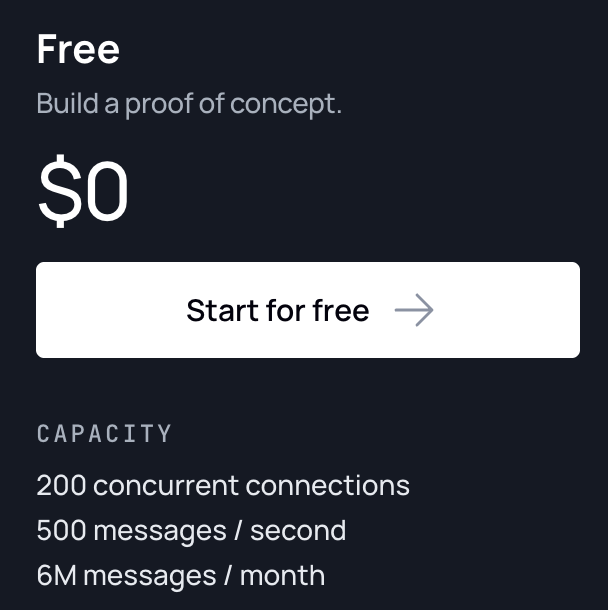
It looks the same, only it now sends messages through and outside host called Ably. This way when we have 10 people in chat and it refreshes every 3 seconds resulting in 30 queries all at once... Is gone. It was killing the CPU/Server. It actually ran well in chat itself, but the rest of the site became unusable at times.
So HOPEFULLY we have taken a huge burden off the server.
I believe i have also fixed the scoreboard updates as well. The period times were getting all messed up and grabbing cached data.
Supposedly this new version can handle up to 200 users at the same time. BUt I never see that happening. We are on Ably's free version as well. So that is even better! I just needed to make a ton of changes in the plugin in order for it to connect and work.
Do not like how this board is run?
Get your own board!
♃
If we have 10 users in chat at once, I consider it a good chat.
It's so much easier to discuss the game in live-time compared to making posts in the game thread. Wish it would really be a main option for the posters here. But, c'est la vie.
When you tell somebody somethin', it depends on what part of the United States you're standin' in... as to just how dumb you are.
In short: GPL Chat now uses Ably to deliver messages in real time instead of constantly polling our WordPress server for updates.
Previously, just 10 people in chat checking for new messages every 3 seconds generated 200 requests every minute, even when nobody was chatting. With 20 people, that jumps to 400 requests per minute! That constant activity was putting a huge strain on the server and sometimes making the rest of the website unusable.
Now, instead of every user repeatedly asking the server for updates, messages are sent to Ably and distributed to connected users in real time. This eliminates most of those repetitive chat requests and should significantly reduce CPU usage.
The chat looks the same, but there's a major change behind the scenes. Now we'll see how it performs during actual game traffic!
Hopefully, this means a faster, more stable Gopher Puck Live for everyone.
Do not like how this board is run?
Get your own board!
♃

Glad to help (for what little I actually did, especially). And keep up the good work, loving all the updates.
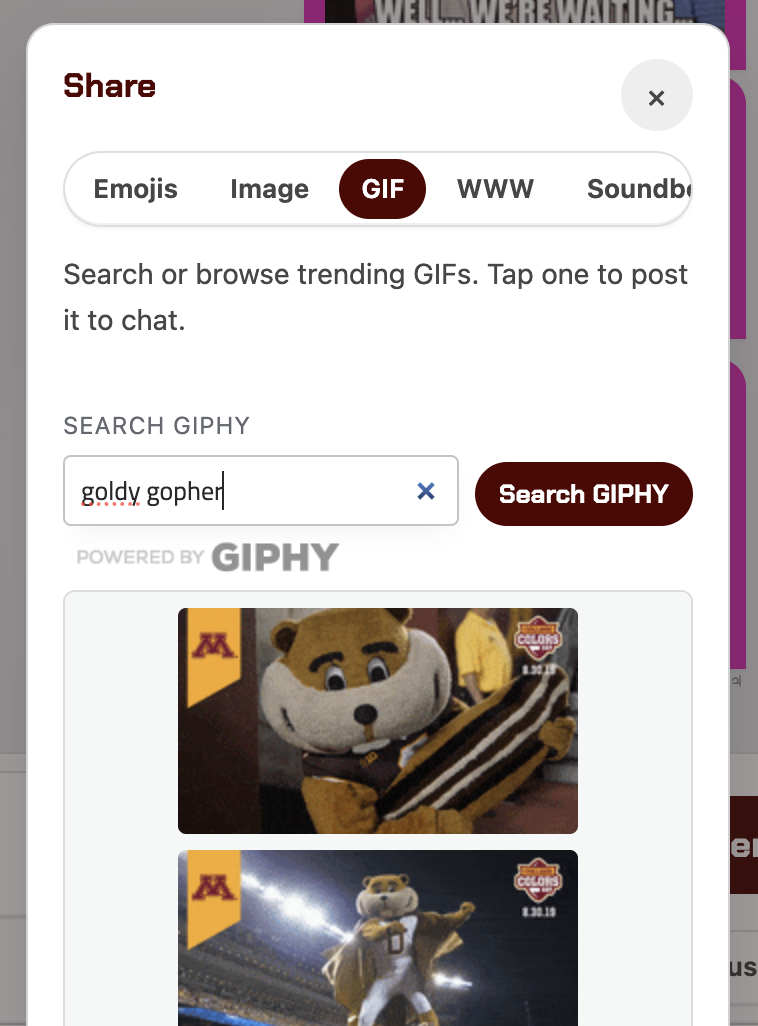
You can share image links and plain URL links from the main chat text window now. No longer need to go to the SHARE area.
Do not like how this board is run?
Get your own board!
♃